The loader
The loader is dinput8.dll in the game’s bin_ship folder, with the address files in bin_ship\daolib\addresses\. It changes none of the game’s files.
Requirements
- The latest Microsoft Visual C++ Redistributable. Download the x86 version, even on 64-bit Windows.
How it loads the game
-
Windows loads it in place of DirectInput’s
dinput8.dll, and it passes every DirectInput call on to the real one.The loader was
version.dllin 0.1.0. Deletebin_ship\version.dllandbin_ship\version.pdbbefore installing 0.2.0. - It finds the build of the game, GOG’s, Steam’s or EA’s, from the address files (#110).
- Before the game’s own code runs, it puts in its fixes and performance changes, below, and the crash logger.
- It loads the plugins,
bin_ship\daolib\plugins\<name>\<name>.dll. - It loads the ASI mods,
*.asiinbin_ship,bin_ship\scripts\andbin_ship\plugins\(Compatibility).
The log is Documents\BioWare\Dragon Age\daolib\loader.log. A crash or a freeze leaves a log beside it.
Fixes
Always on.
| Fix | |
|---|---|
| Archive reads | Two resources read from one archive at once could get each other’s bytes, which crashed the game (#3). |
| Saved file names | A screenshot’s file name was read past its end, which could crash the game (#78). |
| Mouse records | The mouse’s movement was timed from a record past the last one read, which could crash the game (#105). |
| Flickering lights | Fires and torches jumped from one brightness to the next many times a second; they now ease between them, about once a second (#150). |
Performance
| Change | Default | Off with | |
|---|---|---|---|
| Engine heap | The engine’s memory from the system’s heap, not its own 850 MiB of pools (#69). | on | DAOLIB_ENGINE_HEAP=0 |
| All processors | The game on every processor; GOG’s exe starts it on two (#92). | on | DAOLIB_ALL_PROCESSORS=0 |
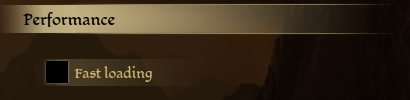
| Fast loading | Areas the party leaves are kept, nearby indoor areas are loaded ahead, and the loading screen is quicker (#75). | off | DAOLIB_FAST_LOAD=0 |
Turn fast loading on with Fast loading under Performance on the options screen’s Game tab (#115).